Free · Open source · Windows

Drag. Drop. Convert.

Hold Shift while you drag any file, and a format wheel opens under your cursor. Release on the format you want. No app window, no upload, no browser tab.

v0.1.1 · 257 MB · portable ZIP · Windows x64 · interface in Simplified Chinese for now

    Try it: drag a file and release it on a petal.

    Three moves. No windows.

    ZestDrop lives in the system tray and wakes up only when you need it, in the middle of a drag you were already making.

    1. 1

      Start dragging

      Select one or more files on the desktop or in File Explorer and start dragging, as if you were moving them.

    2. 2

      Press a shortcut

      Shift opens formats, Ctrl + Shift opens tools. F8 and F9 work too. Once the wheel is open you can let go of the keys.

    3. 3

      Release on a petal

      Drop on the format or tool you want. The new file appears next to the original, which is never overwritten.

    One gesture for every file on your desktop

    The wheel only shows what makes sense for the files you are holding. Here is what is inside.

    Images

    JPG · PNG · WebP · HEIC · TIFF · AVIF · BMP · SVG

    Convert between formats or into PDF. Compress, crop to any aspect ratio, pixelate or blur sensitive areas, adjust exposure, colour and clarity, add a background, strip metadata, or combine several images into a PDF or collage.

    Video

    MP4 · MOV · MKV · WebM · AVI · WMV · GIF

    Convert, extract MP3, or turn clips into GIFs. Compress to a target file size, trim, crop, change speed from 0.125× to 8×, split, join, save frames, remove audio, and redact regions for a chosen time range.

    Audio

    MP3 · M4A · WAV · FLAC · OGG · Opus · AIFF · WMA

    Convert and compress, normalise loudness to a LUFS target, trim with silence removal, adjust channels, bleep out sections, or make a waveform video for sharing.

    PDF & text

    PDF · TXT · SRT · VTT

    PDF to Word, images or text, and text to PDF. Merge, split, reorder and rotate pages, compress, and edit metadata. Subtitles convert between SRT, VTT and plain text.

    Office documents

    Word · Excel · PowerPoint · OpenDocument · CSV

    Export to PDF or images with the exact layout, pick pages, merge several files into one PDF, or switch between Office and OpenDocument formats. Layout exports use your installed Microsoft Office; text and data extraction works without it.

    Archives

    ZIP · TAR · GZIP · RAR

    Pack any files or folders, extract archives, or repack one format as another. Extraction checks for unsafe paths, links and oversized archives before writing anything.

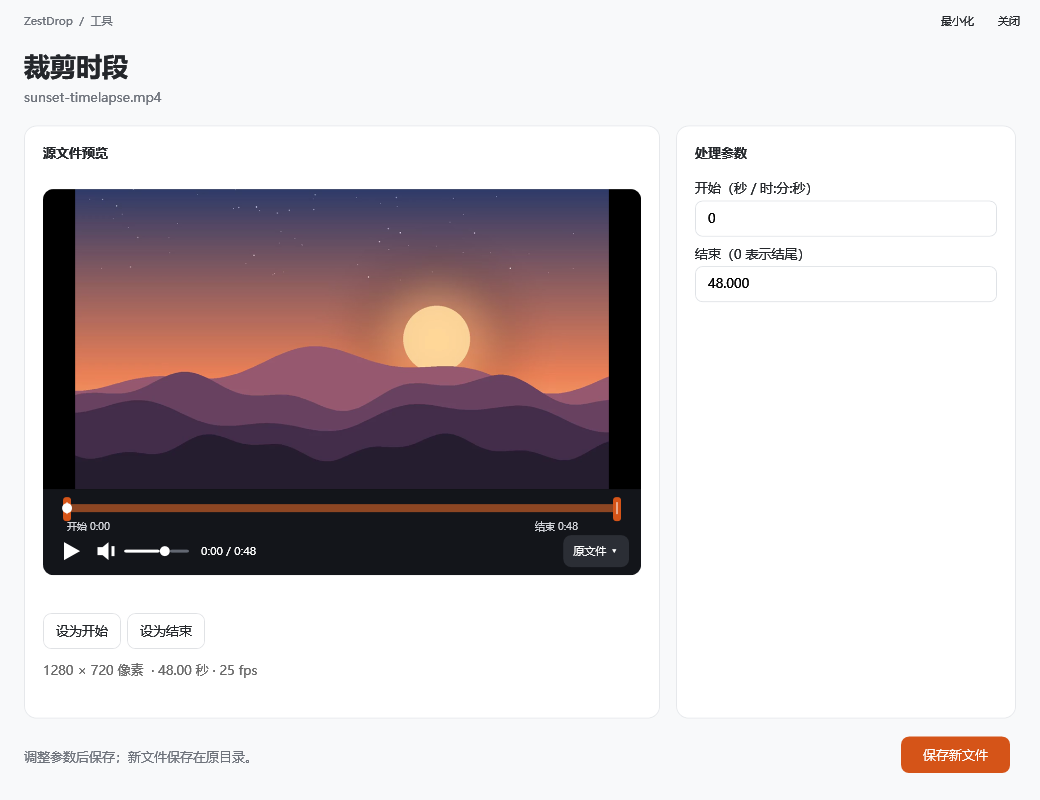
    Real tools when you need them

    Tools that need settings open in their own window with a live preview. Every audio and video tool has a player with a seek bar, and trimming gives you draggable start and end handles.

    The ZestDrop trim tool window, with a video preview, a timeline with orange start and end handles, playback controls and start and end time fields.
    The trim tool: preview, timeline handles, exact times, then save a new file.
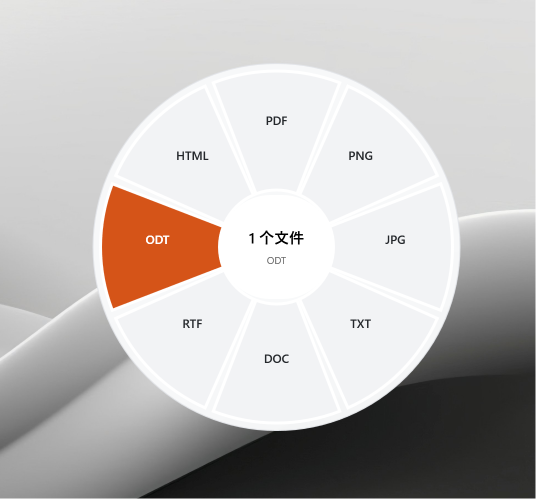
    Format wheel for a document, with ODT highlighted among HTML, PDF, PNG, JPG, TXT, DOC and RTF.
    Document formats · Shift
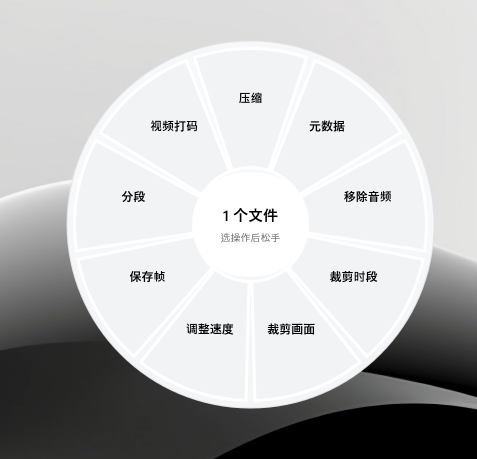
    Tool wheel for a video, with compress, metadata, remove audio, trim, crop, speed, save frames, split and redact.
    Video tools · Ctrl + Shift
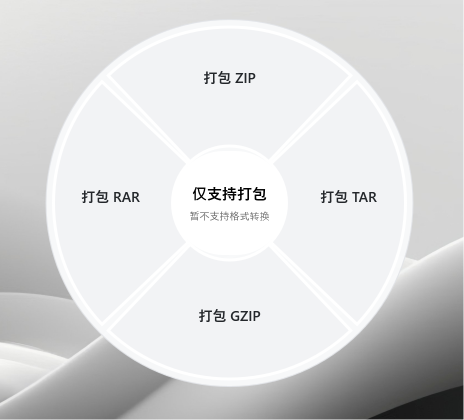
    Wheel offering to pack files into ZIP, TAR, GZIP or RAR.
    Pack anything into an archive
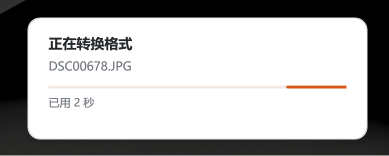
    Progress card in the corner of the screen showing an image conversion with elapsed time.
    A small progress card shows the current file, real processed counts for batches, and elapsed time. Cancel any job from the tray.

    Your files stay on your PC

    Online converters ask you to upload your photos, contracts and recordings to someone else's server. ZestDrop does all of the work on your own machine.

    • Nothing is uploaded. Every conversion runs locally and works offline.
    • Originals are never overwritten. Outputs get a clear suffix, and duplicates get a number.
    • Everything is included. FFmpeg, Python, 7-Zip and .NET ship inside the download.
    • It stays out of the way. No main window, no installer, no startup entries. Quit from the tray at any time.

    Get ZestDrop

    Free for personal and commercial use. Unzip and run.

    Download for Windows

    v0.1.1 · 257 MB · portable ZIP

    1. Download the ZIP and extract the whole folder.
    2. Run ZestDrop.exe. It appears in the system tray.
    3. Drag a file and press Shift.

    Requires Windows x64. The interface is currently in Simplified Chinese. Layout-exact Office exports need desktop Microsoft Word, Excel or PowerPoint.

    Questions

    Windows says “Windows protected your PC”. Is it safe?

    ZestDrop isn't code-signed yet, so Windows SmartScreen warns about any new download from an unknown publisher. Click More info and then Run anyway. To check that your download is the official file, compare it with the SHA-256 checksum published on the release page. The full source code is on GitHub.

    Is it really free?

    Yes. ZestDrop is open source under the MIT License, with no ads, accounts or paid tiers. Bundled components such as FFmpeg, Python and 7-Zip keep their own licenses.

    Are my files uploaded anywhere?

    No. Everything is processed on your computer by the engines bundled in the download, and ZestDrop works with no internet connection.

    Why is the download about 250 MB?

    It includes everything it needs to run: the .NET runtime, a portable Python with its libraries, FFmpeg and 7-Zip. You don't have to install anything else.

    Where do the converted files go?

    Into the same folder as the original, with a suffix such as photo-converted.jpg. If that name is taken, a number is added. Originals are never changed. Right-click the tray icon to open the folder of your latest output.

    Is the app available in English?

    Not yet. The interface is currently in Simplified Chinese. Format names such as JPG or PDF are the same in every language, so conversions are easy to use either way.

    Do I need Microsoft Office?

    Only for layout-exact exports of Word, Excel and PowerPoint files, such as PDF or images. ZestDrop drives your installed Office to do these. Without Office, you can still extract text and table data from modern Office files.

    How do I update or uninstall it?

    Quit ZestDrop from its tray menu. To update, extract the new version into a fresh folder. To uninstall, delete the folder. ZestDrop adds no installer entries or startup items.

    Found a bug or have an idea? Open an issue on GitHub. Please don't attach private files.